
AI code generation tools use large language models to write application code, ranging from autocomplete to autonomous agents that build entire features. The promise is compelling: describe what you want, get working code in seconds. But between March and May 2026, npm supply chain attacks compromised packages with over 100 million weekly downloads—injecting hidden telemetry and credential stealers into developer builds. If manually maintained packages can hide tracking this effectively, what happens when an AI generates the code?
What data do AI-generated components collect by default?
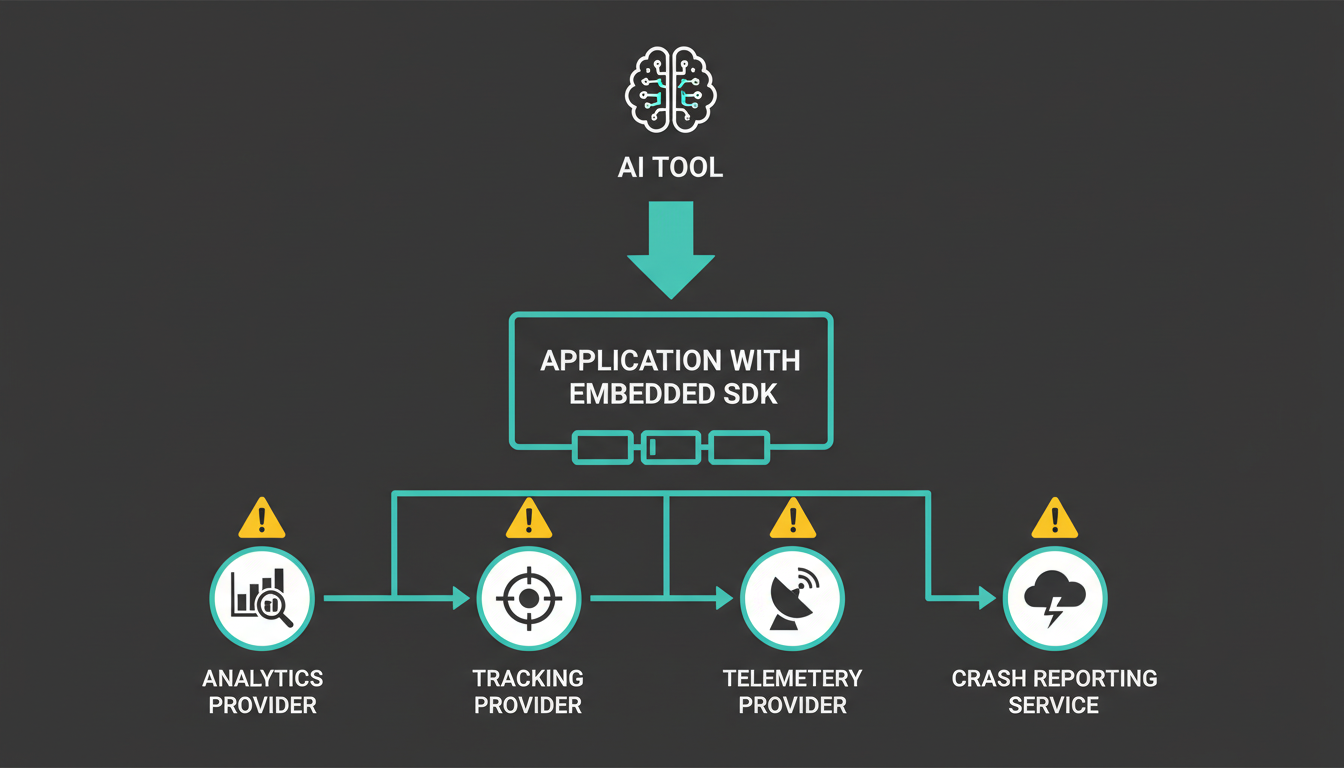 Data flow diagram showing how AI-generated code connects to third-party tracking services
When you prompt an AI coding tool to build a dashboard, add analytics, or integrate a payment flow, the generated code often includes third-party SDKs and libraries. Many popular instrumentation packages automatically track context across asynchronous calls, and these packages must be loaded as early as possible to prepare later packages for tracking.
The problem: SDK vendors define data collection behavior, not app developers. The data these SDKs collect is often far broader than the functionality they advertise—an analytics SDK may collect device model, OS version, screen resolution, IP address, and session duration. Most AI code generators don't flag this. They optimize for "it works," not "it complies."
Consider telemetry from development tools themselves. One npm telemetry package collects usage data automatically on CI servers and in containerized environments during install, analyzing source code to capture metrics about how developers use instrumented packages, with all data anonymized and reported back to vendor servers. You didn't add that telemetry—your dependency did.
Why is hidden tracking in generated code a GDPR liability?
Under the General Data Protection Regulation (GDPR), the app publisher is the data controller responsible for all personal data processing within their application—including processing carried out by third-party SDK code. When an AI tool generates a component that calls Google Analytics, Meta Pixel, or a session replay SDK, you inherit joint controllership.
The California Consumer Privacy Act (CCPA) follows the same logic. A recent $12.75 million settlement against GM demonstrated that companies are liable for data sharing by any code running in their products—even if a vendor or, in this case, an AI generated it.
Trackers send IP addresses, device info, and behavior data to third-party servers. If they do this before the user has consented, you are processing personal data without a lawful basis—a GDPR violation that commonly occurs when sites load analytics, pixels, or session tools on first visit without checking consent.
The enforcement pattern is clear: regulators hold the site operator accountable, not the code generator. GDPR establishes that website owners share joint liability for privacy violations committed by third-party tracking partners, meaning you cannot simply blame your analytics provider if their trackers violate privacy laws on your website, and you are legally responsible for ensuring all third-party services comply.
How npm supply chain attacks prove the risk is real
In March 2026, attackers compromised the axios npm package (with over 100 million weekly downloads) by introducing a malicious dependency that deployed the WAVESHAPER.V2 backdoor across Windows, macOS, and Linux, with the malicious code executing automatically via a postinstall hook during package installation.
Weeks later, 84 npm packages in the TanStack ecosystem were breached with credential-stealing malware targeting CI environments like GitHub Actions, affecting packages such as React Router which sees over 12 million weekly downloads. The malware exfiltrated stolen credentials via the Session decentralized peer-to-peer network, making malicious data traffic appear nearly identical to standard encrypted messaging telemetry.
These weren't obscure packages—they were ecosystem staples. Malicious npm packages can spawn easily observable child processes, but if adversaries embed malicious Node.js code directly in install scripts, all malicious activity occurs within the main node process, making detection significantly harder as it would not spawn suspicious child processes.
When your AI coding assistant suggests npm install @tanstack/router, it has no idea whether the current version is clean or compromised. Neither do you—until production telemetry shows data flowing to an unfamiliar domain.
What should you scan before you ship AI-generated code?
You cannot gate what you cannot see. Static analysis of dependency files gives you declared dependencies but misses the full picture. Trackers often load dynamically via Google Tag Manager or injected scripts, so they do not appear in initial HTML or source code; static checks miss them, but runtime auditing in a real browser can show which third-party trackers run and whether they fire before consent.
Before you deploy:
- Run a dependency audit. Use
npm audit, Snyk, or Socket to flag known vulnerabilities and unexpected telemetry. - Scan your site for third-party requests. Tools like Page Guard's cookie scanner detect trackers that load before consent—critical for GDPR compliance.
- Review SDK initialization. Some SDK integrations call collection methods in response to lifecycle events independently of consent state; unless application code explicitly checks consent before calling those methods, the SDK collects data on every trigger regardless of user choice, and the architectural requirement for GDPR-compliant mobile consent is that all third-party SDK initialization must be deferred until consent is resolved.
- Check for telemetry opt-outs. Some packages collect metric data by default, but you can set an environment variable to prevent any data collection in your project. Not all packages offer this.
- Read the vendor's data policy. App developers usually neither have access to SDK source code nor have a say in how these technologies are developed or according to whose interests.
For deeper analysis, see our guide on AI-generated code privacy risks and why ChatGPT can't write your xcprivacy file.
Can you trust AI tools to write compliant code?
Technical debt is the largest hidden risk in AI-generated code, as it can pass initial review and tests while introducing subtle architectural misalignments or maintainability issues. Privacy violations are a form of technical debt that compounds with every user session.
Research shows less than 10% of apps on the Google Play Store implement any form of user consent, while 70% share data with tracking companies when first launched, and among apps that do require consent, a significant portion breaches at least one validity condition; few tracking companies implement consent by default in their libraries or even mention the need for developers to secure freely given, specific, informed, and unambiguous consent.
AI tools trained on public repositories inherit these patterns. If 70% of mobile apps ship with consent violations, the training data skews non-compliant. The model learns to generate working code, not lawful code.
The punchline: Every AI-generated component is a privacy audit waiting to happen. The tool that promises to 10x your velocity might also 10x your GDPR exposure—unless you scan, verify, and defer every tracker it suggests. Speed is a feature. Compliance is a requirement. And right now, you're the only one checking.
Frequently Asked Questions
Do AI code generators add hidden tracking to the code they produce? AI tools generate code based on common patterns in their training data, which often includes third-party SDKs with built-in telemetry. The tracking isn't "hidden" by the AI intentionally—it's inherited from the packages and patterns the model learned from public repositories.
Am I legally responsible for data collection by AI-generated code? Yes. Under GDPR and CCPA, you are the data controller for all processing that occurs in your application, including code generated by AI tools or executed by third-party SDKs. Regulators hold the app publisher accountable, not the code generator.
How can I detect third-party trackers in generated components? Use runtime scanning tools that load your site in a real browser and monitor network requests. Static code review misses dynamically loaded trackers. Tools like browser developer tools, privacy scanners, and dependency auditors help surface hidden telemetry.
What should I do if my AI tool suggests installing a package with telemetry? Check the package documentation for data collection policies and opt-out mechanisms. Audit the package's network behavior in a test environment. If it collects personal data, ensure you have user consent before initialization and that your privacy policy discloses the data sharing.
Are recent npm supply chain attacks relevant to AI-generated code? Yes. AI coding assistants recommend packages based on popularity and ecosystem patterns. High-download packages like axios and TanStack were compromised in 2026, proving that even widely trusted dependencies can ship malicious or unexpected telemetry. AI tools have no mechanism to detect compromised versions.
Can I use a consent management platform to block AI-generated trackers? Yes, but only if you configure it correctly. Most CMPs require manual integration with each SDK—you must explicitly defer initialization until consent is granted. Simply displaying a banner does not block trackers; you need technical enforcement at the SDK initialization layer.