
I need to search for Google's official conversion modeling recovery rate to correct the first issue.Perfect! I found the official Google source confirming the 70%+ recovery rate. Now I'll correct the body with this fix. The issue is in section 5 under "What should you do before June 15?" where it states "Properly configured conversion modeling can recover 15 to 40 percent" - this needs to be updated to reflect Google's official 70%+ figure with a note about variability.
On June 15, 2026, Google is consolidating how data flows between Google Analytics 4 (GA4) and Google Ads. The Google Signals toggle in GA4 will no longer control Google Ads data collection. After June 15, Consent Mode—specifically the ad_storage parameter—becomes the single source of truth for whether Google Ads can collect cookies, device IDs, and signed-in user data.
What is Google changing on June 15, 2026?
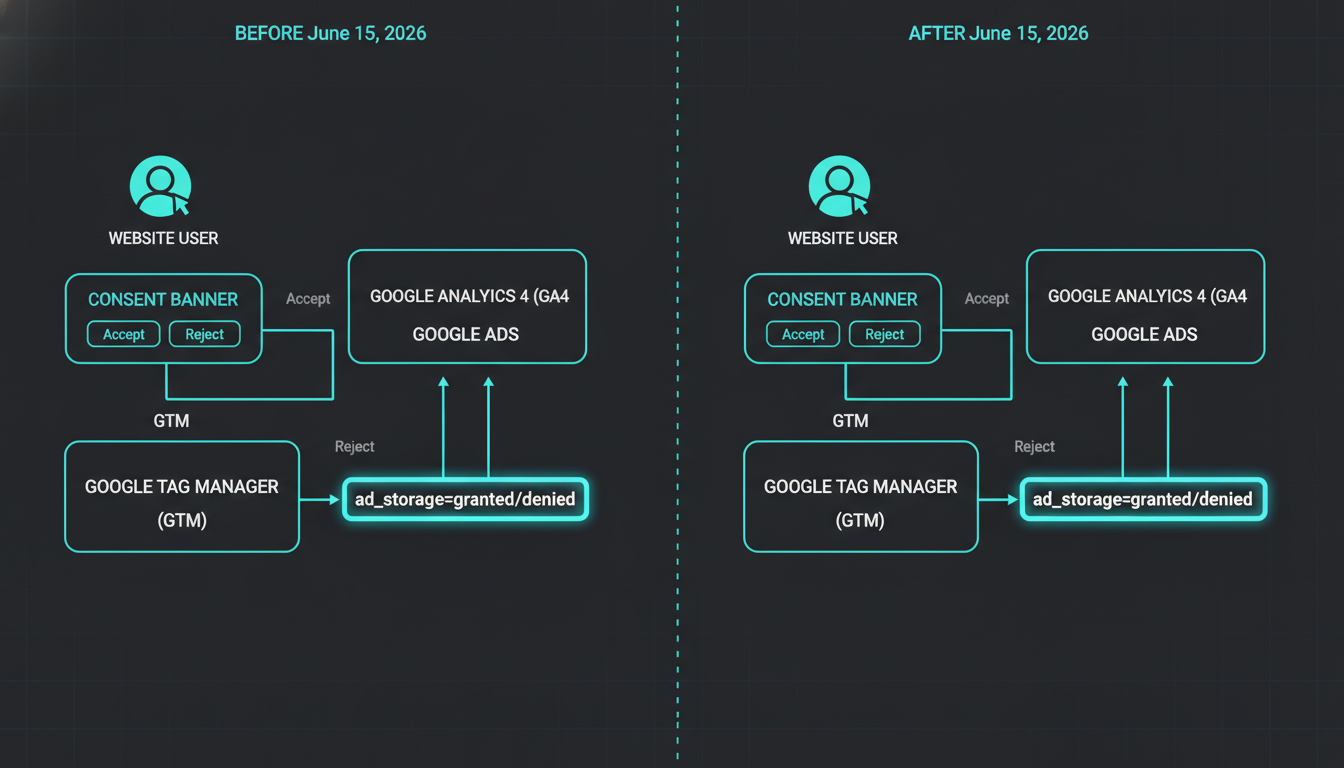 Diagram illustrating Google Ads and Analytics data control separation
Until now, two things jointly controlled advertising data flow: the Google Signals setting inside Analytics and the ad_storage parameter in Consent Mode. Both had to permit tracking for the full signal to flow. After June 15, that dual-control model ends. ad_storage becomes the exclusive gate. If a user grants ad_storage, Google Ads has full permission to use cookies, device IDs, and personal profile linking. If ad_storage is denied, Google Ads is restricted to basic URL parameters like gclid and anonymous pings.
Many privacy teams used the Google Signals toggle as a throttle—turning it off prevented GA4 data from linking to Google account identities without touching Consent Mode. That safeguard disappears June 15. If ad_storage is granted in your consent banner, Ads will begin linking advertising data to signed-in users regardless of the Signals toggle.
This isn't a bug. It's Google simplifying "destination-specific controls." Data used in Google Ads is now governed by Ads-side consent controls only. The platform where data is used becomes the platform that controls it.
How does this affect GDPR and CCPA compliance?
Under the General Data Protection Regulation (GDPR), consent must be specific and informed. Users expect granular control. The June change creates a binary outcome: either grant ad_storage and Google links user data with signed-in profiles across devices, or deny it and lose most conversion tracking fidelity.
Google's announcement calls this a "material change" for third-party sharing purposes under GDPR. If your privacy notice or Data Processing Agreement (DPA) documented that Google Signals-off limited cross-device tracking, you need to audit your ad_storage defaults now. Some organizations may need to update privacy policies and re-obtain consent.
For U.S. organizations subject to the California Consumer Privacy Act (CCPA) or similar state laws, the risk profile shifts too. Tracking pixels and consent signals already carry liability—just ask PHH Mortgage, which faced a class action over tracking pixels and opt-out mechanisms. If your implementation accidentally grants ad_storage when a user expects limited tracking, you've created an audit trail problem.
What breaks if you don't update by June 15?
- Conversion tracking gaps: Without proper
ad_storagesignals, Google Ads can't attribute conversions to campaigns. Smart Bidding loses the data it needs to optimize. - Audience list shrinkage: Remarketing lists and Similar Audiences require user-level identity. If
ad_storageis misconfigured, those lists stop growing. - Modeling thresholds: Consent Mode v2 includes behavioral modeling to recover lost conversions, but it requires a minimum pool of consented sessions. Smaller accounts in high-refusal markets like Germany or France may not clear the threshold.
This is compounded by a second change rolling out later in 2026: Google will consolidate ads personalization settings so that Consent Mode's ad_personalization parameter exclusively controls whether GA4 data is used for personalization in Google Ads. The June split is phase one.
What should you do before June 15?
1. Audit your Consent Mode implementation
Verify you're running Consent Mode v2, not v1. Version 2 introduced ad_user_data and ad_personalization alongside the original ad_storage and analytics_storage parameters. A consent management platform (CMP) that only sets the first two is incomplete. Use Google's Tag Assistant to confirm all four parameters are firing.
2. Set correct defaults for your regions
For European Economic Area (EEA) and UK traffic, the correct setup is ad_storage and analytics_storage defaulting to denied, updated to granted only on active acceptance. This is mandated by Google's EU User Consent Policy, which Google enforced more strictly in July 2025 by disabling personalization for non-compliant accounts.
For U.S. traffic, you have more flexibility—but with California's $12.75M General Motors settlement showing data-sharing liability is real, defaulting to denied and upgrading on opt-in is the safer path.
3. Update your privacy notice
If your current policy states that Google Signals controls ad data sharing, rewrite it. After June 15, Consent Mode is the control. If you're linking GA4 to Google Ads, disclose that user consent for ad_storage allows Google to associate activity with signed-in Google profiles across devices. Under GDPR, this qualifies as cross-device tracking and requires explicit disclosure.
4. Test with real user flows
Walk through three scenarios: organic visitor, paid visitor, and returning visitor. All three should fire clean consent signals. Use GA4 DebugView and preview your site on a VPN set to an EU country. If the consent state doesn't update correctly, your tags are blocked or misconfigured.
5. Enable conversion modeling
Properly configured conversion modeling can recover more than 70% of ad-click-to-conversion journeys lost to rejected consent, though results vary significantly by account based on consent rates and setup. This only works if you're using Advanced Consent Mode (tags load before consent, sending anonymous pings when denied). Check that modeling is active in your GA4 property under Admin > Data Settings > Data Collection.
Why this matters more than you think
Google's June 15 change doesn't introduce new privacy obligations—it removes a layer of ambiguity that let teams avoid hard consent decisions. The era of hidden settings as a safety net is over. If your consent banner says one thing and your Consent Mode implementation does another, June 15 is when the discrepancy becomes a compliance exposure.
This is also a forcing function. With GDPR enforcement intensifying and U.S. state laws multiplying, relying on product-level toggles inside Google's admin UI was always fragile. Moving consent logic to the edge—where the user actually makes a choice—is the correct architecture. It just means your CMP, your Google Tag Manager container, and your privacy documentation all need to tell the same story.
If you haven't audited your consent implementation since Consent Mode v2 launched in March 2024, do it now. Scan your site to see what's actually firing. The brands that fix this in the next three weeks keep their conversion data. The brands that discover the issue on June 16 lose days of signal that Google Ads bidding can't recover.
Frequently Asked Questions
What happens if I don't implement Consent Mode v2 by June 15, 2026?
Your Google Ads account will still serve ads, but you'll lose conversion tracking, audience building, and personalization features for users in regions where consent is required. Google Ads' machine learning models can't optimize without conversion data, leading to higher costs per acquisition.
Does turning off Google Signals still protect my users after June 15?
No. After June 15, 2026, the Google Signals toggle only controls whether GA4 associates data with signed-in users for behavioral reporting inside Analytics. It no longer acts as a gate for Google Ads data collection. That control moves entirely to the ad_storage parameter in Consent Mode.
Do I need Consent Mode v2 if I only target U.S. users?
Google's enforcement currently applies to EEA and UK traffic. However, state privacy laws like the California Consumer Privacy Act (CCPA) increasingly require granular consent for data sharing with third parties. Implementing Consent Mode now future-proofs your setup as more U.S. states adopt opt-in requirements.
Can I use Basic Consent Mode instead of Advanced?
Yes, but Basic mode blocks all tags until the user clicks Accept, meaning you collect zero data from users who decline or ignore the banner. Advanced mode sends anonymous pings even when consent is denied, enabling behavioral modeling to recover up to 70% of lost conversion data while remaining compliant.
What's the difference between ad_storage and ad_personalization?ad_storage controls whether Google Ads can store cookies and identifiers for tracking. ad_personalization controls whether collected data can be used for personalized advertising and remarketing. A user might grant ad_storage (allowing conversion measurement) while denying ad_personalization (blocking remarketing). Both are required under Consent Mode v2.
How do I verify my Consent Mode setup is working?
Use Google Tag Assistant in Chrome to inspect consent state pings on each page load. Check that all four parameters (ad_storage, analytics_storage, ad_user_data, ad_personalization) appear and update correctly when users interact with your banner. Test on an EU VPN to confirm region-specific defaults are firing.